
Comparing YubiKey & Token
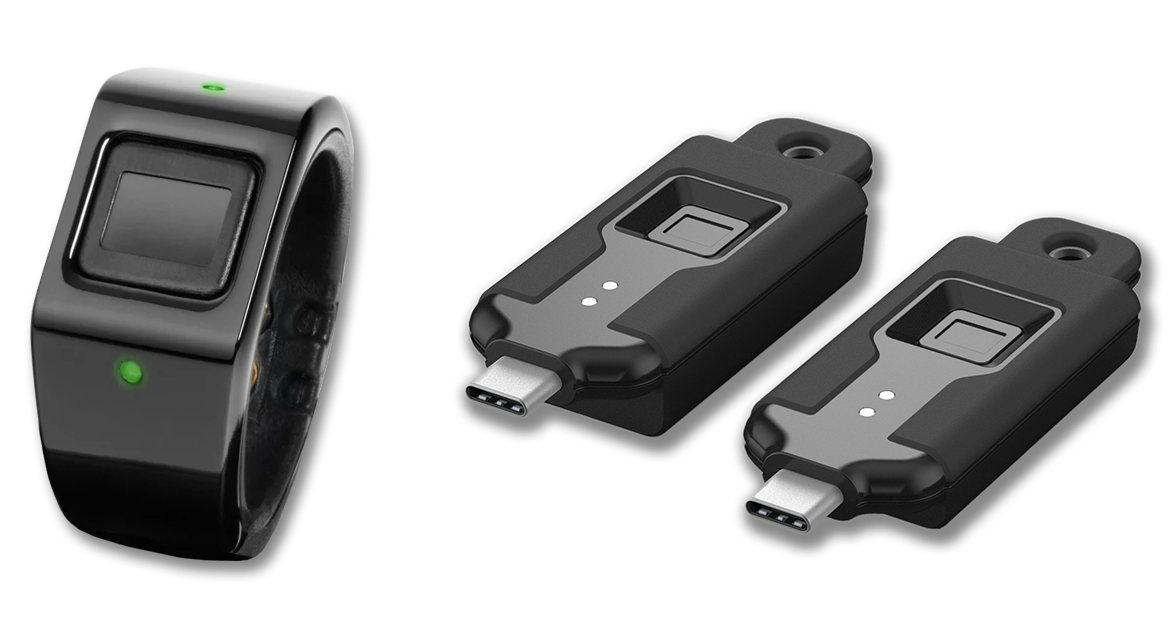
Token and YubiKey offer hardware-based authentication, but Token Ring and Token BioKey support wireless, proximity-based authentication with biometric verification, enabling login only when the authorized user and device are present, without repeated plug-and-touch interaction
Similar Goal, Different Models

.svg "Token - Stronger protection than passwords and one-time codes")
Hardware-based authentication
Support for FIDO standards used by identity providers
Stronger protection than passwords and one-time codes
That's where the similarities end.
Similar Goal, Very Different Security Models
Both Token and YubiKey aim to reduce reliance on passwords and one-time codes by using hardware-based authentication.
YubiKey follows a possession-based model. Authentication requires inserting a key and manually confirming a login.
Token takes a biometric-first approach with wireless proximity detection. Token Ring and Token BioKey require a fingerprint match and verify that the device is nearby before authentication can complete. Authentication is also bound to the correct domain and supports OTA security updates.
These differences shape both the login experience and how each approach holds up against phishing relay attacks and stolen keys.
Token vs Yubikey at a Glance
Both Token and YubiKey use hardware to secure logins, but they differ in how identity, proximity, and phishing resistance are enforced at login.
| Feature | Token Ring & Token BioKey | YubiKey |
|---|---|---|
| User interaction at login | Automatic with wireless proximity and fingerprint | Insert key and manually confirm |
| Proximity-based authentication | Yes, authentication only when device is nearby | No |
| Biometric verification | Yes, fingerprint required on device | No |
| Convenient wireless | Yes | No |
| Domain-bound authentication | Yes | Yes, limited to FIDO origin checks |
| Protection against phishing relay attacks | Yes | Partial, depends on authentication method |
| Usable if stolen | No, fingerprint required | Yes |
| Over-the-air security updates | Yes | No |
| Form factors | Wearable ring and wireless device | USB and NFC models |
| Passwordless support | Yes | Yes |
How Each Approach Holds Up Against Real-World Attacks
.png?width=600&height=600&name=ICON-Phishing%20Relay%20Attacks-611x611%20(1).png "ICON-Phishing Relay Attacks-611x611 (1)")
Phishing and Relay Attacks
Modern phishing attacks increasingly rely on real-time relay techniques. Instead of stealing credentials, attackers trick users into approving a login while the attacker proxies the session to the legitimate service.
YubiKey can block many phishing attempts when used with FIDO authentication. However, the level of protection depends on the authentication method in use and how the key is deployed.
Token Ring and Token BioKey require a live fingerprint match and wireless proximity to the user’s device before authentication can complete. This prevents authentication from being relayed or approved outside the user’s physical context, even if a user is tricked into interacting with a fake login page.
Lost or Stolen Devices
Hardware authentication assumes that possession of a device equals authorization. When a device is lost or stolen, that assumption becomes critical.
If a YubiKey is lost or stolen, it can still be used by anyone with physical access to the key, depending on the authentication method and policies in place.
Token Ring and Token BioKey cannot be used without a successful fingerprint match. Even with physical access to the device, authentication cannot proceed unless the authorized user is present. Wireless proximity is also required, preventing authentication from occurring outside the expected physical context.

Why This Difference Matters
Both approaches raise the security bar compared to passwords and one-time codes.
The difference is enforcement.
Possession-based keys reduce risk.
Biometric and wireless proximity-based authentication removes entire attack paths.
Move Beyond Possession-Based Security
See how biometric and wireless proximity-based authentication removes entire attack paths.